

Flutter 3.38 has landed—and it’s a meaningful polish release with targeted UX improvements and a handful of breaking changes that you’ll want to address immediately. In this post, we explain what’s new, what breaks, and how to migrate quickly with copy-paste snippets. We also call out team impacts for iOS, Android, and Web so you can ship safely today.
1. Quick overview: what’s changed
The official Flutter 3.38.0 release notes highlight numerous framework and tooling updates, including cleanups across Material, iOS, Web, and more. Notably, the docs reaffirm the new Flutter Widget Previewer: IDE support now requires Flutter 3.38+ (previewer works from 3.35+, but the IDE auto-start behavior is new in 3.38).
- Framework & Material tweaks and deprecations aligned with modern APIs.
- Widget Previewer: run live widget previews in Chrome; IDEs auto-start from 3.38.

2. The four breaking changes you must handle
Flutter 3.38 ships with four breaking changes that can affect UI behavior, accessibility, and overlay rendering. Below we break down each change and provide a minimal migration snippet.
2.1 Wide-gamut Cupertino colors: use r/g/b/a & withValues()
To align with wide-gamut color spaces (introduced earlier in Flutter 3.27), several properties on CupertinoDynamicColor were deprecated in favor of float-based accessors r/g/b/a and withValues(). Replace red/green/blue/opacity/withOpacity() accordingly.
// Before
final o = CupertinoColors.systemBlue.opacity;
final x = CupertinoColors.systemBlue.withOpacity(0.5);

// After
final a = CupertinoColors.systemBlue.a;
final x2 = CupertinoColors.systemBlue.withValues(alpha: 0.5);
Why this matters: you get accurate float-precision channel values aligned with color-space semantics. Timeline: landed 3.36.0-0.1.pre, stable in 3.38.
2.2 OverlayPortal.targetsRootOverlay → overlayLocation
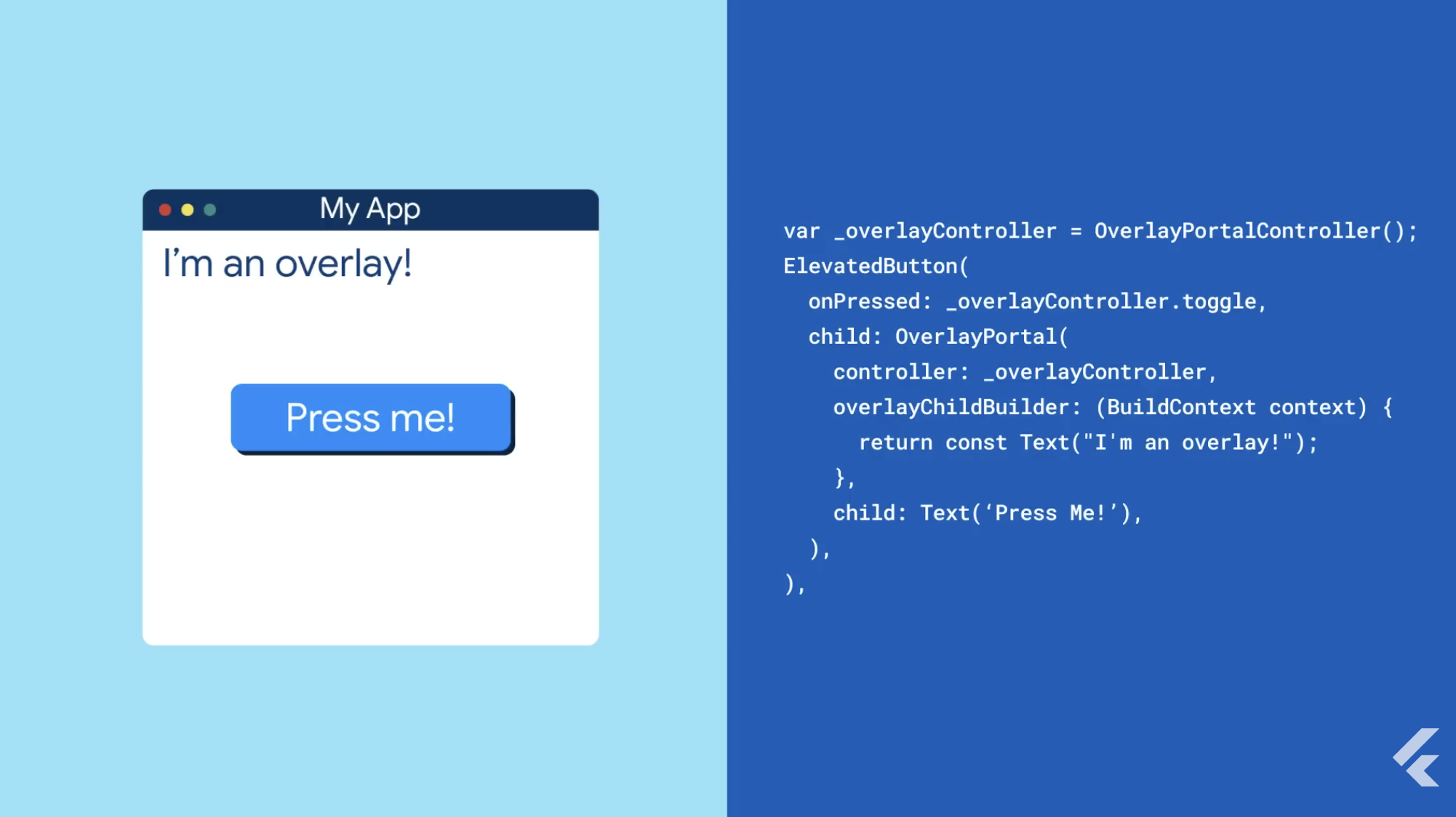
The OverlayPortal.targetsRootOverlay constructor is deprecated. Use the default constructor with overlayLocation to choose where the overlay renders (e.g., OverlayChildLocation.rootOverlay).
// Before
OverlayPortal.targetsRootOverlay(
  controller: myController,
  overlayChildBuilder: _builder,
  child: myChild,
);

// After
OverlayPortal(
  overlayLocation: OverlayChildLocation.rootOverlay,
  controller: myController,
  overlayChildBuilder: _builder,
  child: myChild,
);
Timeline: landed 3.38.0-0.1.pre, stable in 3.38.
2.3 Accessibility: isFocusable → isFocused (nullable)
SemanticsProperties.focusable and SemanticsConfiguration.isFocusable are deprecated. Use focused/isFocused instead. Setting isFocused to true or false implies focusable true; setting it to null implies focusable false. This matches the engine’s tri-state focus.
// Before
void describeSemanticsConfiguration(SemanticsConfiguration config) {
  config.isFocusable = true;
  config.isFocused = true;
}

// After
void describeSemanticsConfiguration(SemanticsConfiguration config) {
  config.isFocused = true; // focusable implied
}
Timeline: landed 3.37.0-0.0.pre, stable in 3.38.
2.4 Material: SnackBar with action no longer auto-dismisses
Any SnackBar that includes an action is now persistent by default and will not auto-dismiss until the user interacts. To keep the old behavior, set persist: false. This aligns with Material 3 and improves UX/accessibility.
// Before (auto-dismissed after duration unless talkback)
ScaffoldMessenger.of(context).showSnackBar(
  SnackBar(
    content: Text('Saved'),
    action: SnackBarAction(label: 'Undo', onPressed: () {}),
  ),
);

// After (explicitly restore auto-dismiss)
ScaffoldMessenger.of(context).showSnackBar(
  SnackBar(
    content: Text('Saved'),
    persist: false,
    action: SnackBarAction(label: 'Undo', onPressed: () {}),
  ),
);
Timeline: landed 3.37.0-0.0.pre, stable in 3.38.

3. Upgrade checklist (copy this into your PR)
- Run
flutter upgradeto 3.38; update CI images and local SDK pins. - Search-replace in Cupertino colors:
.red/.green/.blue → .r/.g/.b,.opacity → .a,withOpacity() → withValues().
- Replace
OverlayPortal.targetsRootOverlaywithOverlayPortal(overlayLocation: ...). - Replace
isFocusable/focusablewithisFocused/focused; usenullto indicate non-focusable. - Audit all SnackBars with actions; decide between default persistence or
persist: false. - Optional productivity boost: enable the Widget Previewer in your IDE (requires 3.38+) for faster UI review loops.

4. Team impact: where this will surface in real products
- Design/Brand teams: wide-gamut Cupertino colors remove channel quantization—expect more accurate color reproduction on modern iOS devices.
- Frontend engineers: SnackBars with actions stick around; update flows that relied on timed dismissal (e.g., save/undo patterns).
- Accessibility QA: semantics focus is clearer and less error-prone—adjust automated tests accordingly.
- Nav/Overlays: overlay placement is explicit via
overlayLocation; fewer surprises when composing complex layers (menus, tooltips, dialogs). - DX/Tooling: Widget Previewer in IDEs at 3.38 speeds review cycles for component libraries and design systems.
5. Sample PR description text
“Upgrade to Flutter 3.38 and migrate breaking changes: Cupertino wide-gamut APIs (r/g/b/a, withValues), replace OverlayPortal.targetsRootOverlay with overlayLocation, adopt isFocused semantics, and review SnackBars with actions to set persist explicitly. Verified widget previews via Widget Previewer.”
Conclusion
Flutter 3.38 focuses on quality and clarity: better color semantics, more predictable overlays, accessible SnackBars, and cleaner semantics APIs. With the migration steps above, your team can upgrade quickly and safely—and take advantage of IDE-native Widget Previews to speed up UI iteration.
CTA: Book your free consultation today to plan your Flutter 3.38 upgrade and ship a smoother, more accessible app across iOS, Android, and Web.